Step by step guide
The first thing I had to do was to make sure I had the relevant hardware. I knew that the code itself would not be hard to write, but what might be harder was the fact that I had to initialise it on some hardware that would be next to the doorbell itself. This might prove difficult as I only had experience in writing and testing software but I had never experimented with hardware before.
I therefore turned to the solution of using a Raspberry Pi, a super small computer that is so simple to use that it is used by children as their first foray into computers and programming.
Along with a Raspberry Pi, I also needed some sort of sound detector that would be able to detect a doorbell ring but not be too sensitive and detect footsteps, or people talking.
I therefore bought the following items for the project:
Raspberry Pi (https://www.amazon.co.uk/gp/product/B01CD5VC92/ref=ppx_yo_dt_b_asin_title_o02_s01?ie=UTF8&psc=1)
SD Memory Card - to make sure the Pi would have plenty of memory for Python and other modules needed to work (https://www.amazon.co.uk/gp/product/B073JWXGNT/ref=ppx_yo_dt_b_asin_title_o02_s00?ie=UTF8&psc=1).
Sound Detection Microphone (https://www.amazon.co.uk/gp/product/B07ZHGDYF7/ref=ppx_yo_dt_b_asin_title_o03_s00?ie=UTF8&psc=1).
Jumper Cables - to connect the microphone to the Pi (https://www.amazon.co.uk/gp/product/B074P726ZR/ref=ppx_yo_dt_b_asin_title_o03_s01?ie=UTF8&psc=1).
Process Guide
We will now outline the steps we took to complete this project, there were only two.
Step 1 - Sort out the hardware
The first step would be to make sure that the sound detector is properly connected to the Pi.
To achieve this, we needed three female to female jumper cables (brown, black and white). The sound sensor has four prongs but we only need three of them to correctly connect them to the Pi:
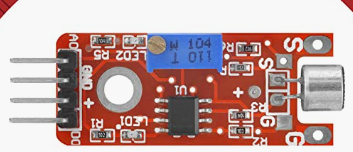
The prongs we need on the sensor are the power (+), the ground (GND) and the digital out signal (D0):
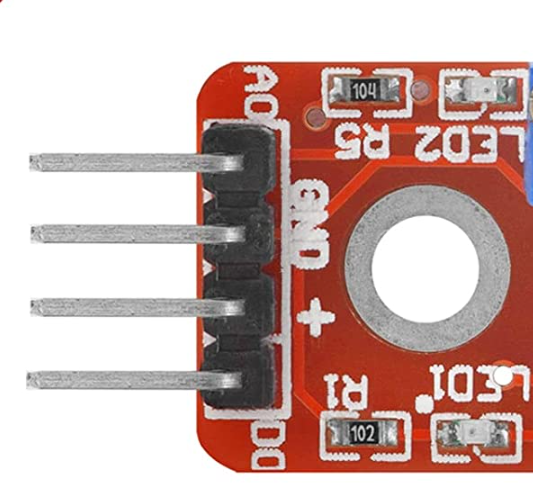
When we then connect the sensor to the Pi, we should see both red lights come on (the two LEDs). To make sure that our sensor has the correct sensitivity, we need to adjust it so the second led flashes when there is a loud sound but not to every sound. We need a flat screwdriver to adjust the blue bit on the top until we achieved our desired sensitivity (turn counterclockwise until the red light disappears then experimented accordingly):

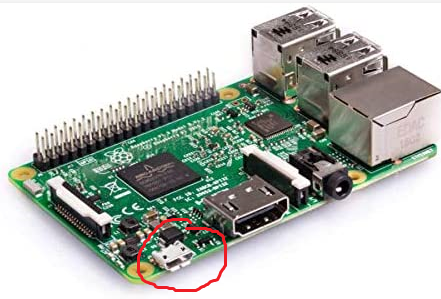
We then need to power up our Pi and make sure that the sound sensor is working accordingly:
Step 2 - Write the code
We will now write code such that when there is a sound detected, we receive a notification on our phone.
To do this, we will use the Pushbullet API to send us notifications on our phone. More information can be found here: https://www.pushbullet.com. Simply sign up and make an API token which we will use later.
Once we have set up the API token, we can then use it to send notifications to our phone using a post request:
msg = {"type": "note", "title": title, "body": body}

resp = requests.post(
    "https://api.pushbullet.com/v2/pushes",
    data=json.dumps(msg),
    headers={
        "Authorization": "Bearer " + TOKEN,
        "Content-Type": "application/json",
    },
)
We will then make use of the RPI.GPIO (https://pypi.org/project/RPi.GPIO/) library to programatically listen to when the sensor is triggered:
import RPi.GPIO as GPIO

CHANNEL = 17
GPIO.setmode(GPIO.BCM)
GPIO.setup(CHANNEL, GPIO.IN)

def doorbell_callback(channel):
    if GPIO.input(CHANNEL):
        doorbell_notfication(config)
        time.sleep(600)
    else:
        doorbell_notfication(config)
        time.sleep(600)

GPIO.add_event_detect(CHANNEL, GPIO.BOTH, bouncetime=300)
GPIO.add_event_callback(CHANNEL, doorbell_callback)
Note that we have set the function doorbell_callback to sleep for 600 seconds since we do not want to bombarded with notifications on our phone. A notification is sent, the function then waits 10 mins before sending another one.
We should then get a notification on our phone accordingly. In my case, I built this thing to notify me when someone is ringing the doorbell and I am in the outbuilding or the garden:

Drawbacks
There are a few drawbacks to this codebase and project, the first is that the sensor that is connected to the PI, only detects decibals and sends an alert accordingly.
So is someone went near the Pi and shouted loudly, we would get alerted on our phone. If a dog also decided to bark loudly next to the Pi, the sensor would still pick this up. So a point of improvement would be to use more sophisticated methods to detect only the doorbell instead of all noises. We may need to employ ML models to do this properly.
The second drawback is that the Pi now sits besides the doorbell, so if my dog, Slinky, was suddenly feeling adventures and decides to chew or even sniff the Pi; it might put the sensor out of alignment.